


A drumless track is a song with the drum part removed. Bass, guitars, keys and vocals keep playing, the kit goes quiet, and the seat behind it is yours. Drummers have bought these on CD for decades; you can now make one from any recording you have the rights to, in a few minutes, with the drumless track maker.
Making it is the easy part. What you do with it afterwards is where most practice sessions quietly fall apart.

What actually comes back
The song is split into four stems: vocals, drums, bass and everything else. Kick, snare, hats, cymbals, toms and percussion all land in the drum stem. When the separation finishes, the practice screen opens with that stem muted and the rest of the band playing, under a label that reads "No drums: drums muted". "Turn the drums on" beside it brings the original part back when you want to hear what the drummer on the record played. Tempo and pitch are untouched, so the track still sits exactly where the original did and your click will agree with it. A "Drums" panel opens under the lanes by itself as well, with the drum part written out and running along with the song; without an account it covers the first 32 bars or 30 seconds, whichever is shorter.
You can play along, loop and slow the song down without an account. A file is a different matter: "Song without drums", the first thing under "Download", and every other download there need a free account.
Separation is not surgery. Percussive noise that lives close to the drums, a tambourine buried in the mix, the tail of a snare in the room reverb, some of that survives. On a dense modern mix you will hear a faint shadow of the old kit under yours. It bothers you for one pass and then you stop noticing.
Making one
Drop a file on the page and press start. The ceiling is 64 MB and 7 minutes of audio without an account (10 with a free one), which covers a normal MP3 of almost any song you would practise to, and the formats accepted are MP3, WAV, FLAC, M4A and OGG. Processing takes one to three minutes.
The first time you upload anything, we ask you to confirm that you have the right to use the recording. It is one checkbox and it is not decoration: separation is a technical operation and the copyright on the original recording is untouched by it. Your band's rehearsal recordings, your own demos, a track you licensed, anything in the public domain. If you want to publish what you play over the top, that is a question about the underlying song, and our copyright page is where takedowns and questions go.
Finished stems stay for 24 hours without an account, 14 days on a free account and 90 days on Pro. A free account shows the five most recent separations in your workspace; the older ones still exist, they are just behind the plan.
Find the tempo before you play a note
You need the number for two reasons: to set a click that agrees with the track, and to know afterwards whether you drifted or the band did. Play the drumless track and tap along on the BPM tapper in a second tab, using the spacebar so both hands stay free. The practice screen prints a tempo at the top as well, counted by the server once it has analysed the song. Tapping it yourself still tells you something that number can't.
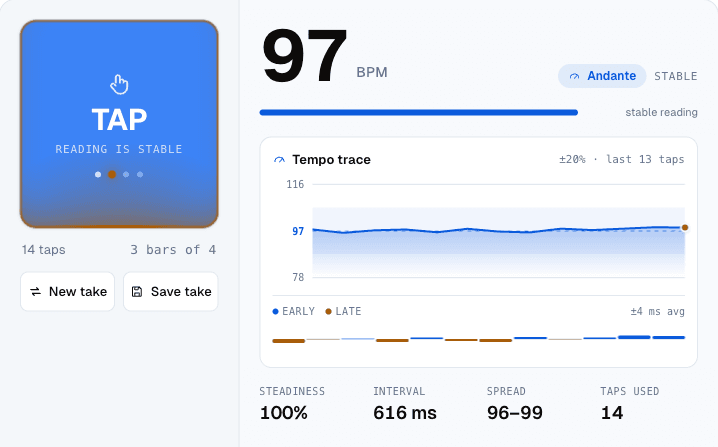
Eight taps give you a stable reading. Keep going to twelve or so and the panel starts telling you something more useful than the tempo: the steadiness figure and the trace show whether your tapping wandered. If the trace slopes, you are speeding up, and you have learned that before sitting down rather than after.
One trap is worth naming. If you tapped 174 on something that clearly is not fast, you tapped eighth notes. Halve it. The same mistake in the other direction gives you half of a fast tune, and both feel right while you are doing them.
Put a click under it
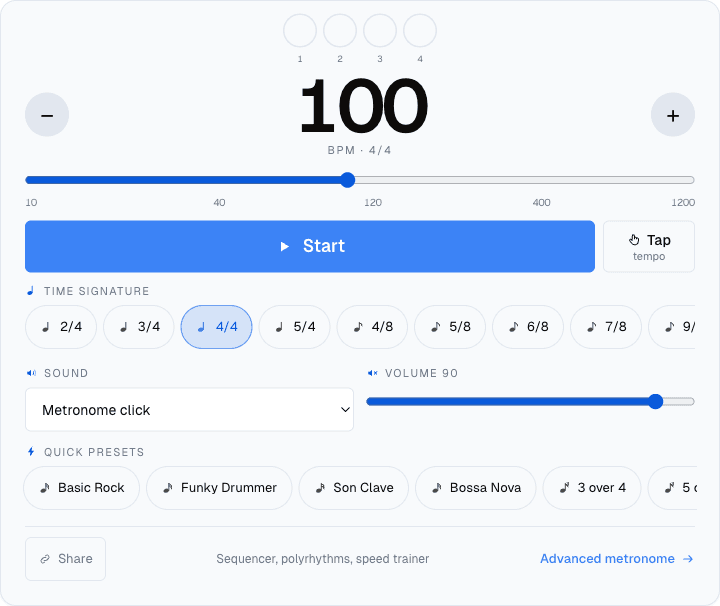
Open the metronome in a second tab at the tempo you just read. Play the drumless track through one speaker or one side of your headphones and the click through the other, and you have a rehearsal room where the band never rushes and never gets tired.
If tapping is not your idea of a good time, the audio editor measures the tempo for you when you drop the file in, and it puts half and double buttons right next to the reading, because a browser makes the same octave mistake your hands do. And if you would rather play against a groove than a click, backing tracks builds a drum part over a progression at a tempo you set.
Four ways to practise with it that are not just playing along
Playing the whole song top to bottom feels productive and teaches you the parts you already know. These do more.
- The intro, twenty times. Loop the first eight bars. Coming in cleanly is the hardest thing a drummer does with a track and the thing nobody practises.
- Drop out for four bars. Stop playing, keep counting, come back in on the one. If you land early you are rushing, and no amount of playing along tells you that.
- Play the fills only. Time is easy when your hands are already moving. Sit through the verse doing nothing and put the fill exactly where it was.
- Learn the bass line. With the original drums gone, the bass is suddenly audible, and the bass is what you are really locking to.
No kit at the moment
A drumless track is still useful without one. Play the pattern on the virtual drum kit from your keyboard, or program it into the beat machine and check your version against the arrangement. We have written up both: the browser kit and seven ways to practise without a kit.
Then, when the track is playing and there is no drum part in it, the room is unusually quiet and it becomes very obvious what you were going to play. That is most of the exercise.
Pick a recording you have the rights to, ideally one you already know well, and run it through the drumless track maker.


