


The karaoke maker hands you a backing track to sing over, and it doesn't do it as a file to download. When the separation finishes you're on a practice screen with the voice already muted. It's built for looping a phrase until it sits right. The server fills in a measured tempo, the sections and the chords while you sing, and from there it's a short path to a lead sheet with the vocal melody written out. All of it runs on the same job, no second upload.
What the separation actually returns
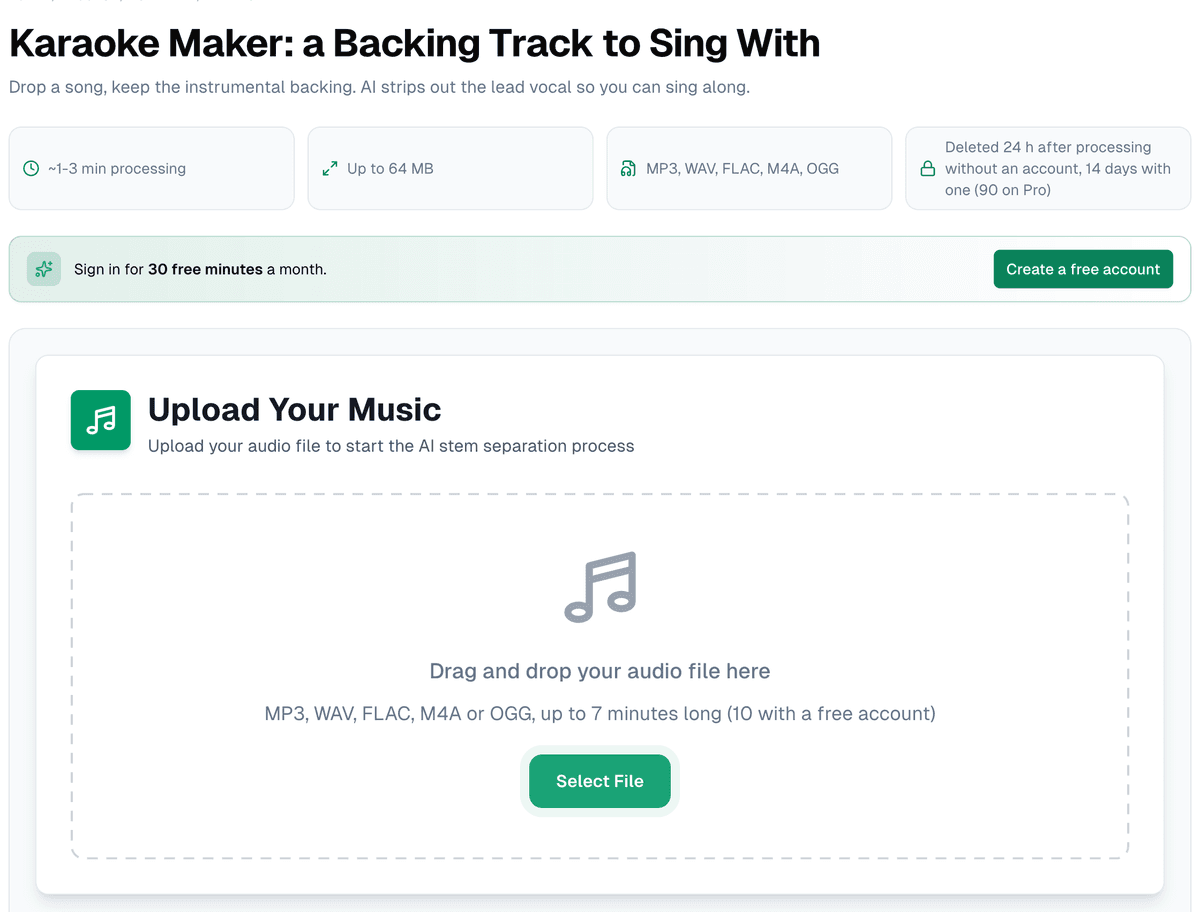
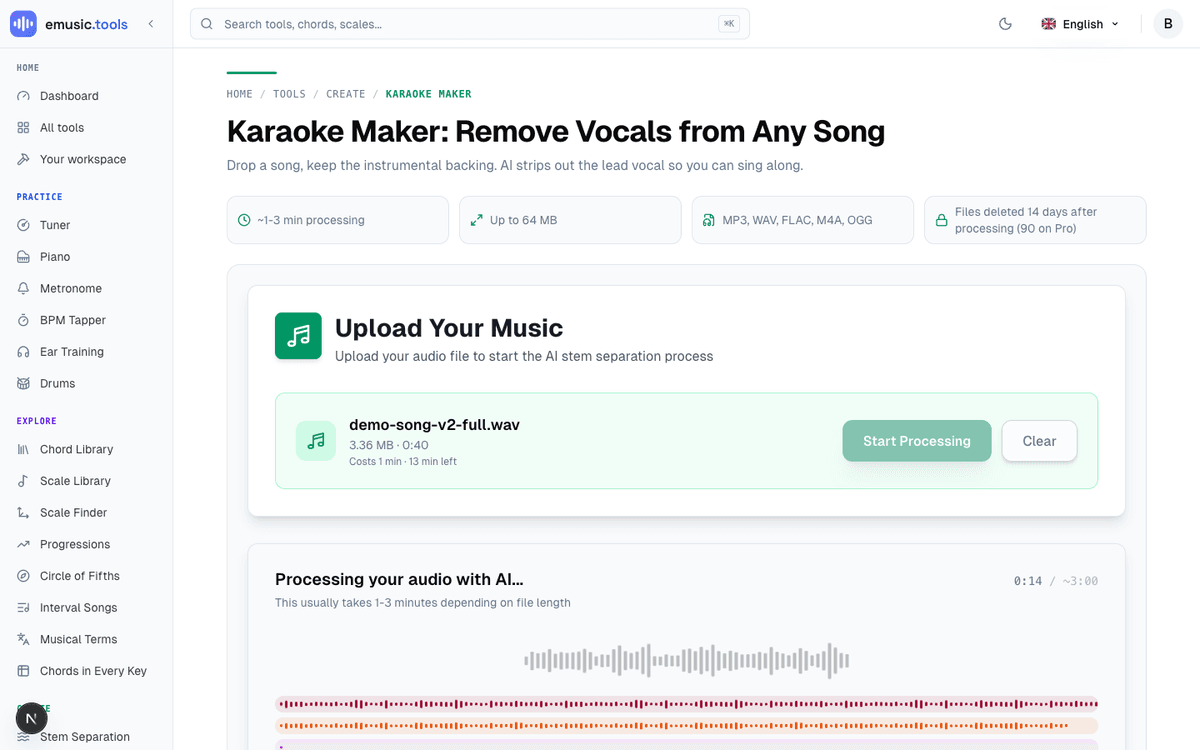
Drop a file up to 64 MB in MP3, WAV, FLAC, M4A or OGG (up to 7 minutes long without an account, 10 with a free one), confirm you have the right to use it, and the song is split into four stems: vocals, drums, bass and everything else. Keeping the band in three parts rather than one means you can still turn the drums down or solo the bass when a note won't land.
Where it lands
No results list, no button to find. The practice screen opens by itself with four lanes, "Vocals", "Drums", "Bass" and "Other", each with its own waveform, M (mute), S (solo), a volume slider and a download button. The vocal lane starts muted and greyed out with "muted, you play this part", and a label at the top reads "Karaoke: vocals muted", with "Turn the vocals on" beside it for when you want to check a line against the singer. Above the lanes sit the tempo with half-time and double-time buttons, the key, and "Open in the editor", "New separation", "Lead sheet", "Download" and "Share".
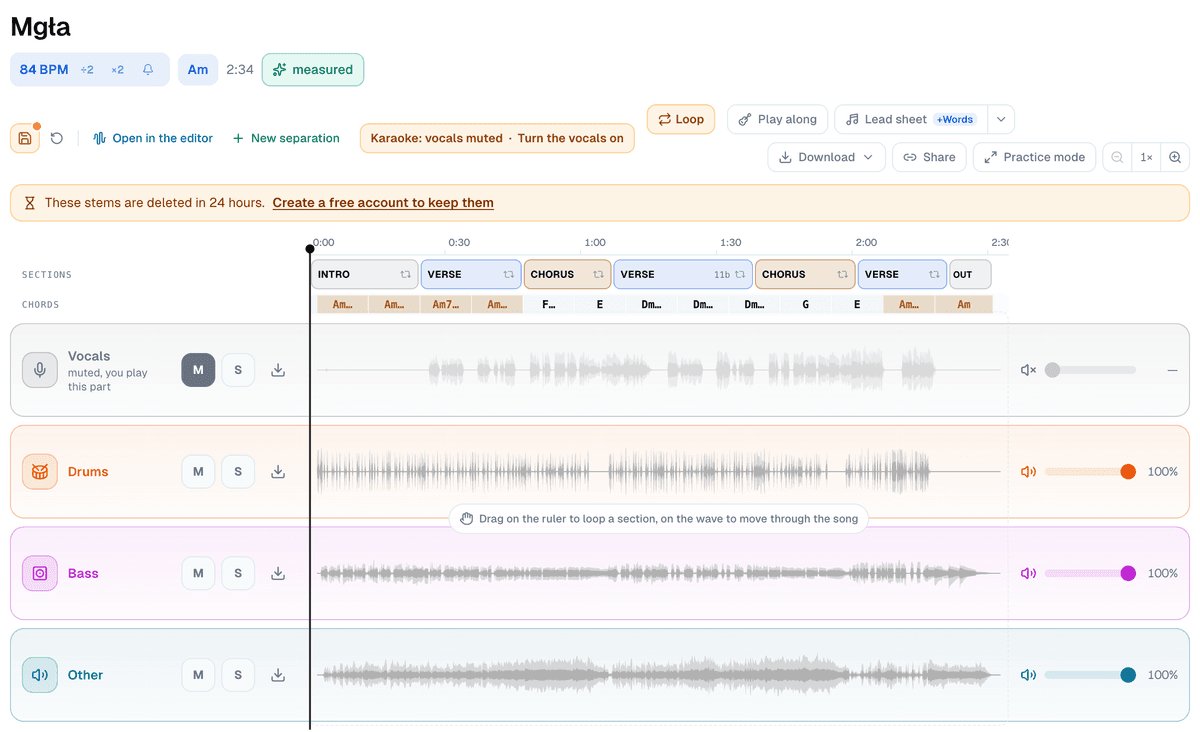
Without an account, a line under the tools says "These stems are deleted in 24 hours", with a link to create a free account that keeps them for 14 days. Singing along, looping and changing the key don't need one.
Practice mode
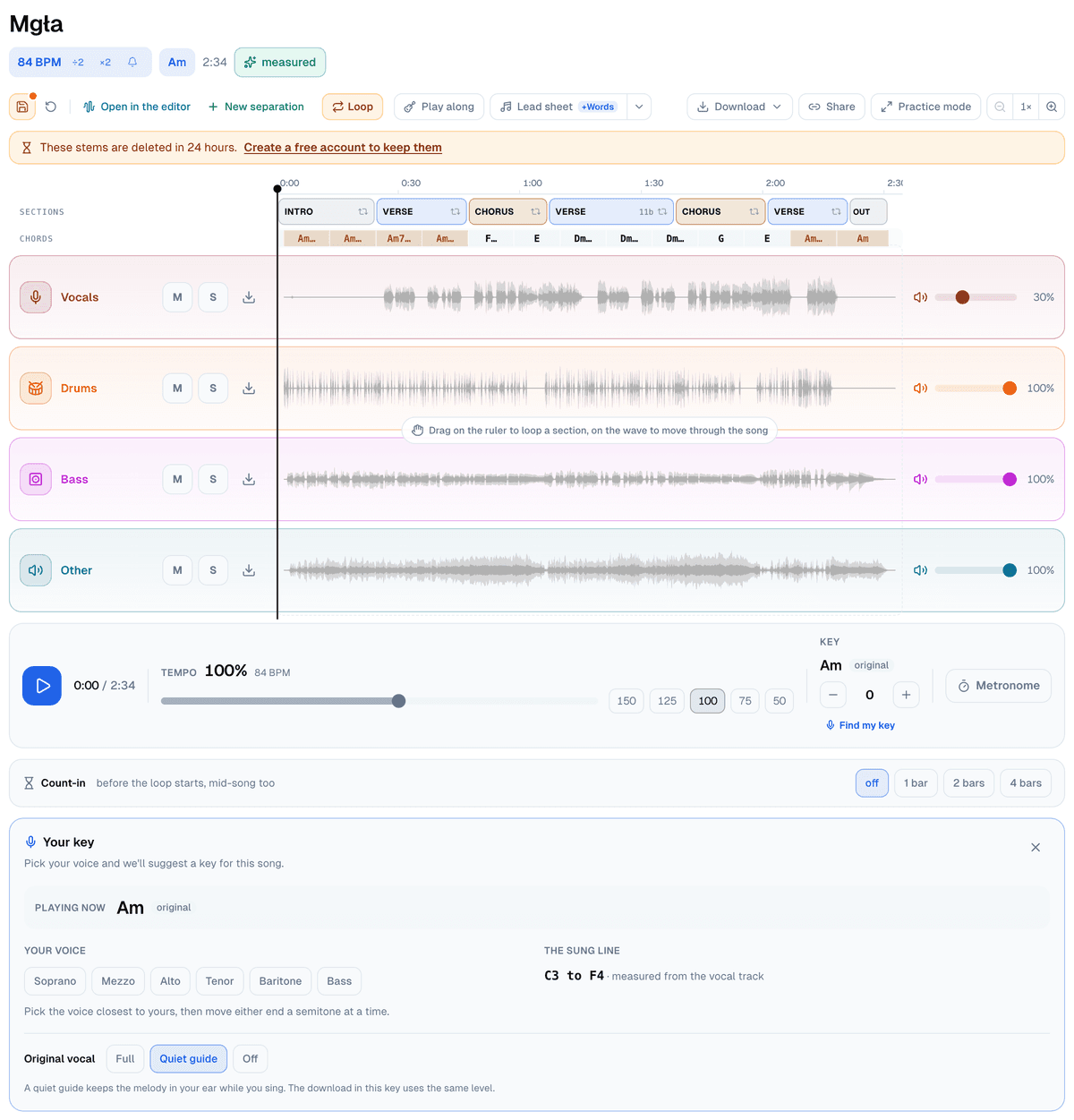
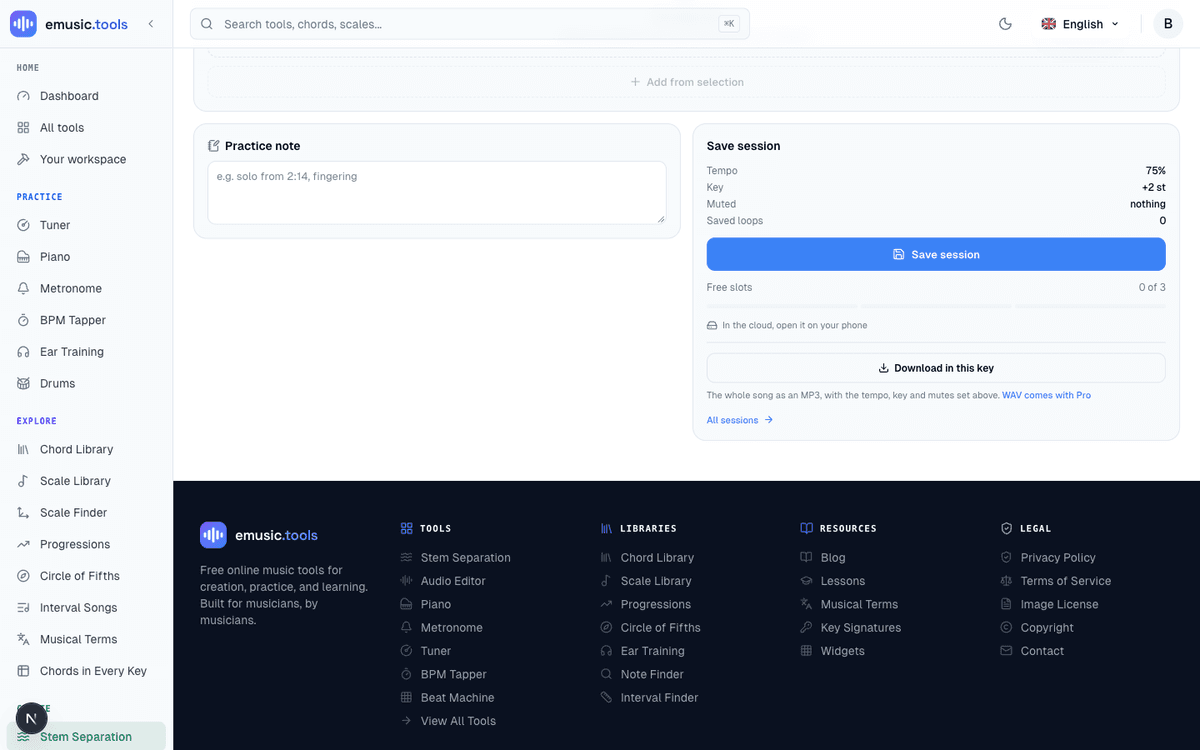
The practice screen gives you what actually helps while learning a lyric line. Drag along the time ruler above the lanes to loop a phrase, or press "Loop" to loop the bars under the playhead (a drag on the waveform itself moves through the song). The tempo slider runs continuously from 40% to 150% without shifting pitch, with five preset buttons (150, 125, 100, 75, 50) for a quick jump. There's a semitone transpose for whoever's singing, which moves the whole song, a metronome, and a count-in of a bar, two bars or four, with a click mid-song too if the loop doesn't start on beat one. "Save session" keeps the tempo, key, muted parts and loops; without an account it stays on that device, and a free account keeps three sessions in the cloud, so a session started on a laptop is there again on a phone.
Under the key control sits "Find my key". It opens a panel called "Your key", which measures the sung line from the vocal track and, once you pick a voice type, suggests how many semitones to move the song.
Take the whole song to rehearsal
The save session card has a second button under the free-slots count: "Download in this key". It renders the whole song, not just the loop you have been practising, at the tempo and key on screen right now. Whatever you muted stays out, and whatever fader you nudged is baked in, so a vocal kept at a quiet level as a guide comes out just as quiet in the file. It needs an account, like every file on this screen; a free one gets a 192 kbps MP3, and "WAV comes with Pro" for a lossless copy. The file lands named after the song and what changed, something like "Song Title (+2 st, 85%).mp3", so five keys downloaded for five different singers do not all look the same in a folder.
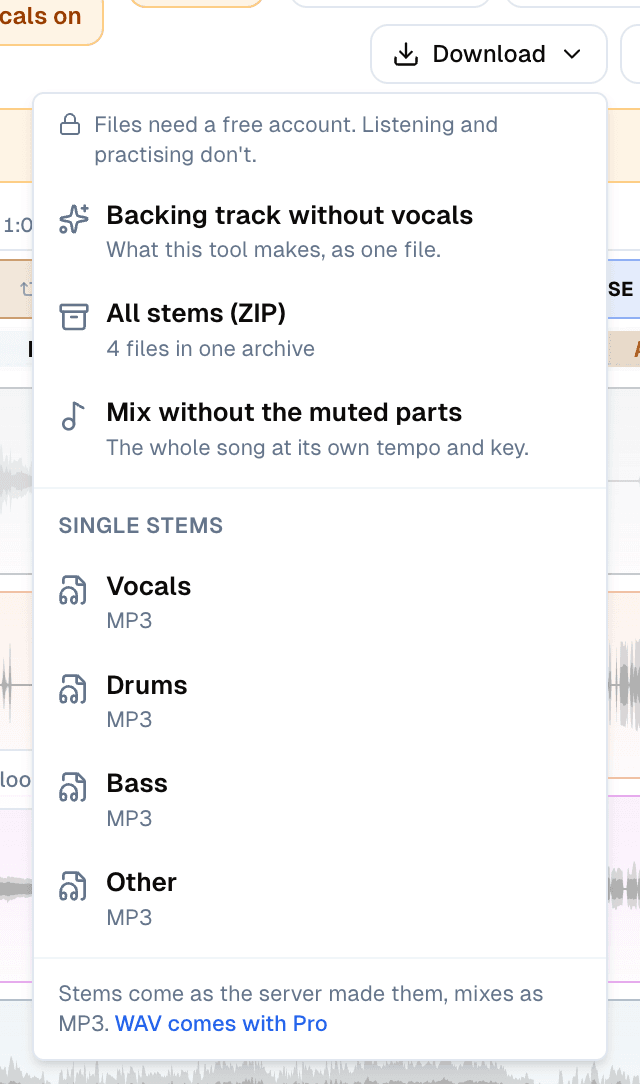
If you only need the plain backing track, open "Download" instead. Its first item is "Backing track without vocals", the three other stems mixed into one file at the song's own tempo and key. After it come "All stems (ZIP)", "Mix without the muted parts" and each stem on its own. Without an account, any of them asks you to create a free one, and the file starts downloading once you're back.
You don't have to find the chorus by ear either. After the separation the server counts the beats and marks the verses, choruses and chords in the background, for every job, account or not, and they show up as two rows over the lanes, "Sections" and "Chords". Click a section ("Click to loop it") and the screen loops it bar-accurate, useful for finding the second chorus without scrubbing past the bridge to get there.
The wand: from a browser guess to a measured tempo
The tempo and key at the top show up before the server has said anything, read out of the audio by your own browser. When the server's count arrives, a green "measured" label takes the place of the button next to them, and that happens by itself on your own fresh separation. The button it replaces, "Get it exact", is the wand, for a song that arrives without the count. Signed in, press it and it switches to "Measuring…" while the server counts instead of estimating; without an account it reads "Sign in for the exact grid".
Three outcomes follow. The server can confirm the browser had it right. It can correct the reading, with an arrow shown between the old value and the new one. Or the measurement can fail outright, and the interface says so rather than pretending otherwise: "That didn't work. You still have what your browser worked out." next to a "Try again" button. The estimate never disappears either way; a miss just means you don't get the upgrade this round. An account gets 50 of these runs a day across every tool that offers the wand, karaoke track or otherwise. The estimate keeps working past that limit; only the exact count waits for the daily reset.
From a measured tempo to a lead sheet
Once there's a beat grid, a signed-in practice screen offers "Read the tune", which works out a melody on top of the chords already found. The server reads it off the separated vocal, the part the karaoke maker muted, so what gets written down is the vocal line that's now missing from your backing track. The button reads "Reading the tune…" while it runs, and finishes as "Lead sheet with the tune" rather than a plain "Lead sheet" link, meaning what's waiting for you has a melody staff, not just chords over empty bars.
Either link opens the standalone Lead Sheet Maker, a full chord-and-rhythm editor on its own: bars per row, a note grid down to sixteenths, pushes and slash chords, first and second endings, and a melody staff for the tune itself.
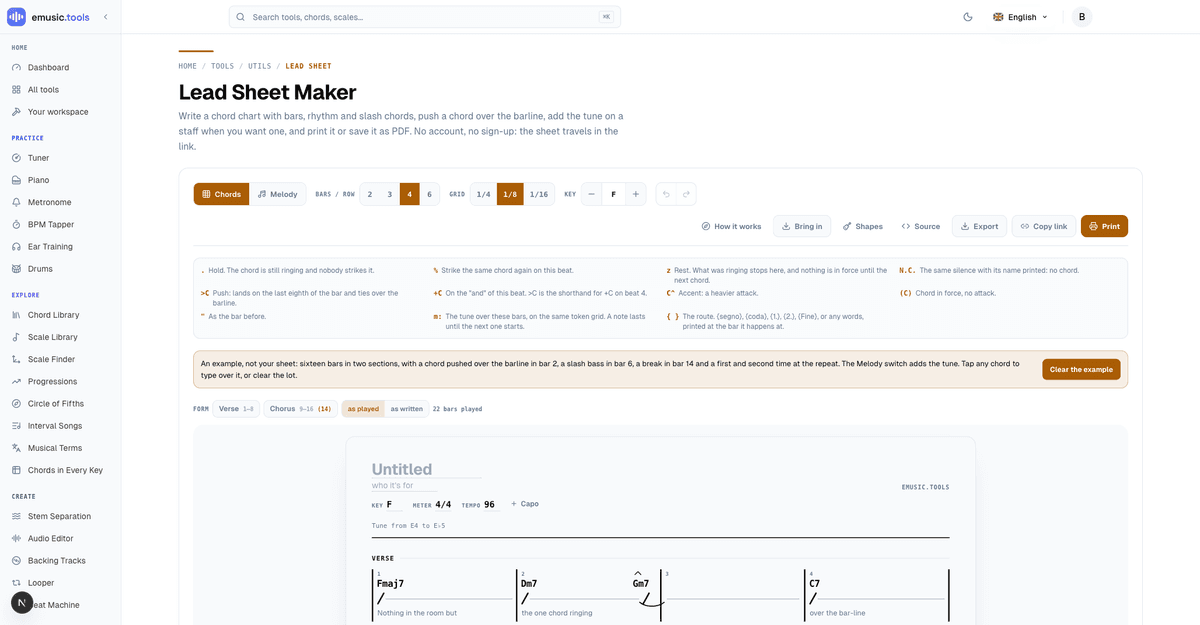
The editor itself needs no account. Nothing saves by default, and the sheet travels as a link, which matters if you're sending it to whoever's singing rather than keeping it for yourself.
Put it together
Start to finish: upload once, sing over the backing track with its measured tempo, sections and chords without signing in, create a free account when you want the file, and press "Read the tune" for a lead sheet with the actual melody on it. Nothing past the first upload asks for another file. Start at the karaoke maker and the practice screen, the wand and the lead sheet are all one job away.
Cover photo: studio microphone and pop filter, by Audio Mix House, CC BY 2.0, via Wikimedia Commons, cropped and resized.


.jpg)