


The key on a recording is whoever's key the original singer happened to have, not yours. Nothing about a song requires the version you learned it in, and the chord transposer has a section built for exactly this: pick your voice type, and it suggests five keys that usually suit that voice, whatever the song, so you start from a sensible guess instead of checking key after key by ear.
Step 1: pick a voice type, not a key
Paste the chords in, then scroll to "Find a key for your voice." Six options: soprano, mezzo-soprano, alto, tenor, baritone, bass. Pick one and a row of recommended keys appears next to it, each one a button: click a key and the whole chart transposes there immediately, no semitone math required.
The recommendations aren't the same five letters for everyone. Alto gets C, D, E, F, and G; tenor gets A, B, C, D, and E; bass drops to E, F, G, A, and B, a fourth below the tenor's. If a song sits high in the original key, this alone is often the fix, not because the tool knows your exact range but because "alto" or "tenor" already narrows the guess to something in the right neighborhood, faster than working it out chord by chord.

Step 2: keep the easy shapes with a capo
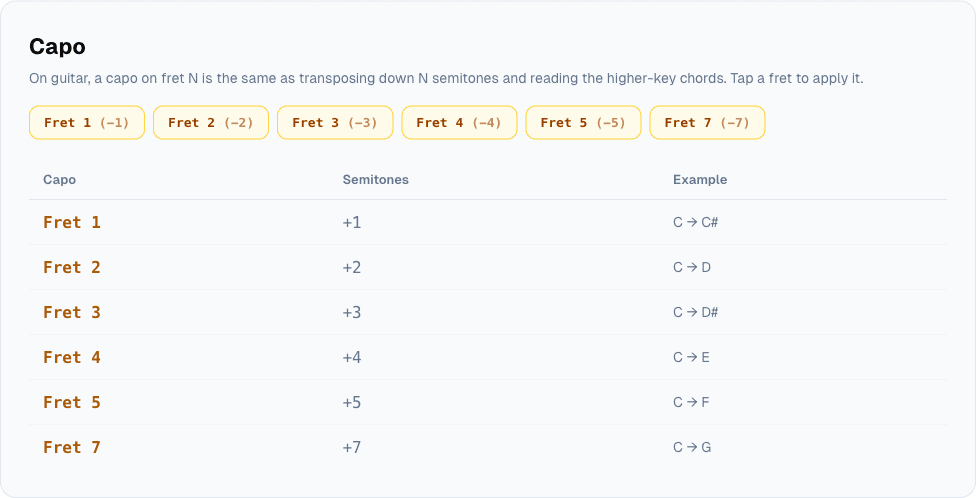
A recommended key sometimes lands you on chords that are awkward to play open, especially on guitar. That's what the capo section is for: tap a fret and the tool transposes the chart down by that many semitones, so you play the easier shapes from a lower key while the capo brings the actual pitch back up to where you need it. Fret 2 takes it down two semitones and fret 5 down five; the buttons run from 1 to 5, then jump to 7.
The table underneath is a plain reference for the other direction: it shows what capo fret gets you from any given open chord up to a higher-sounding one, for example fret 2 for a whole step up. Between the two, you get the same benefit a real capo gives a guitarist standing in a room: sing in the key that fits, play the shapes that are actually comfortable.
Step 3: the moves people actually ask for
Above the capo section sit three shortcuts under "Common moves": one shifts down three semitones for a lower voice or an E♭ horn like the alto sax, one shifts up five for ukulele, one shifts up two for a B♭ horn like a trumpet or a tenor sax. None of them are exotic: they're the three transpositions that come up often enough that typing a semitone number by hand got old.
Between the voice picker and these three chips, most of what "change the key for my voice" actually means in practice is covered without ever opening a calculator or counting frets in your head.
Paste a song into the chord transposer, try a voice type, and see where it lands. If a recommended key needs shapes you don't want to play, the capo table is right below it.
Cover photo: studio microphone and pop filter, by Audio Mix House, CC BY 2.0, via Wikimedia Commons, cropped and resized.


.jpg)