


Two different questions get asked around tempo, and two different tools answer them. "What BPM is this song?" is a job for the BPM tapper: tap along and it does the math. "Play a click at 128 BPM so I can practise" is a job for the metronome, which does not measure anything, it just keeps time once you already have a number. This is about the first tool, and about what to do once it hands you a number.
Eight taps, one number
Hit the big pad or press space in time with the beat. The reading stays blank for the first tap or two, then starts moving, and by the eighth tap it settles into something you can trust. Under the hood it is averaging the gaps between your last twelve taps, so a couple of early stumbles get diluted out rather than dragging the whole reading off.
One setting matters before you start: "I tap on" defaults to quarter notes, which is right for most songs. If the track is fast enough that tapping every quarter note starts to feel like a sprint, switch it to half notes and tap every other beat instead. Tap tempo, tempo counter and BPM counter are all names for the same idea; whichever term you searched, this is the tool.
Four numbers under the big one
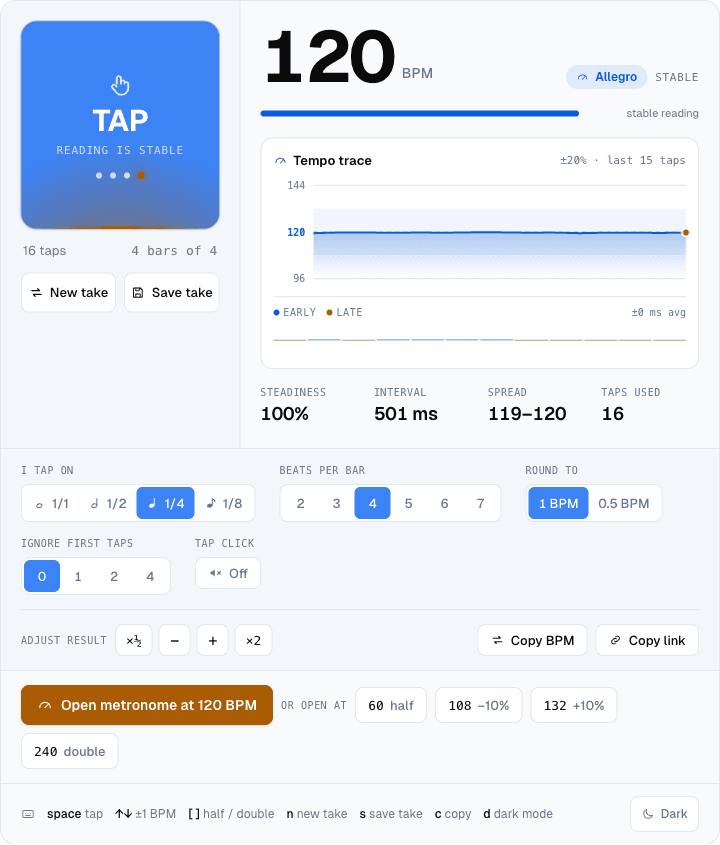
Steadiness is the one to watch. It is not just "how many taps" but how consistent the gaps between them were, and past about 95% you can stop tapping and trust the figure. Interval is the raw gap between taps in milliseconds, which is the same number the ms/Hz converter further down the page starts from. Spread shows the lowest and highest instantaneous reading in the run, so a spread of 119 to 120 means your hand was nearly a metronome itself, while a spread of 108 to 134 means the track had some rubato or you did. Taps used just confirms how many of your taps made it into the average.
Two mistakes the tapper can't catch for you
Tap the wrong subdivision and you get a real, clean, confidently wrong number. Half-time and double-time are the classic traps: a slow hip-hop beat with a fast hi-hat can pull your hand toward the hi-hat's tempo instead of the actual pulse, and the tapper has no way to know which one you meant. The fix lives right next to the reading: the ×½ and ×2 buttons in "Adjust result" flip between the two readings instantly, so if 174 BPM feels twice as fast as the song actually sounds, one click gets you 87.
The other trap is your own first couple of taps, which are almost always less steady than the rest of the run while your hand finds the pulse. "Ignore first taps" drops the first one, two or four taps from the average without making you start over, which is the cheaper fix compared to tapping the whole eight again.
What to do with the number
The most direct move is the button right under the reading: "Open metronome at [X] BPM" hands the exact figure straight to the metronome, time signature included. Next to it sit four related tempos, half, minus ten percent, plus ten percent and double, which exist for exactly the half-time doubt from the last section: if you are not sure which reading is real, those four links let you audition all the likely candidates in one click each rather than retyping numbers.
If the number is headed into a DAW instead, the tapper includes an ms/Hz converter further down the page: the same BPM as a delay time in milliseconds for a quarter note, an eighth, a dotted eighth (the classic guitar slapback), a triplet, and as a plain LFO frequency in Hz for syncing a tremolo. And if you are not ready to use the number yet, "Save take" keeps up to eight named readings in this browser, so "verse - 96 BPM" and "chorus - 101 BPM" from the same song don't overwrite each other while you work through it.
On the other side: the metronome
Once a tempo is confirmed, the metronome is where you actually practise against it. It covers 10 to 1200 BPM and a long list of time signatures, including the odd ones: 5/4, 7/8, 9/8, 11/8 and 13/8 all load with their natural grouping accents already in place, so 7/8 clicks as a long-short-short feel instead of seven identical beats. The quick presets go further into groove territory, from a basic rock beat to a 3-over-4 polyrhythm, and the metronome has its own tap-tempo button too, for the times you want to set a tempo and start the click in one motion without leaving the page.
Start with the BPM tapper, get a steady reading, and send it wherever it needs to go next.
Cover photo: Nikko mechanical metronome, by Vincent Quach (Invincible), CC BY-SA 3.0, via Wikimedia Commons, cropped and resized.


