


You've probably been there: you're about to play, your guitar sounds terrible, and of course, you don't have your tuner with you or it's out of battery. Don't stress. These days, you don't need to buy a clip-on tuner or download apps full of ads.
You can tune your guitar straight from your phone or computer browser. Here's how to do it quickly and why it works so well.
What exactly is an online tuner?
Basically, it's a website that uses your device's microphone to "listen" to the note you're playing. It tells you instantly if the string is too loose (flat) or too tight (sharp). It's just as accurate as a physical tuner, but without the hassle.
What do you need?
- A phone or computer with a microphone
- Internet (just to load the page, then it usually runs on its own)
- Your guitar (classical, acoustic or electric, it doesn't really matter)
- A bit of silence (too much background noise can make detection harder)
How to use the emusic.tools tuner step by step
Step 1: Open it and allow access
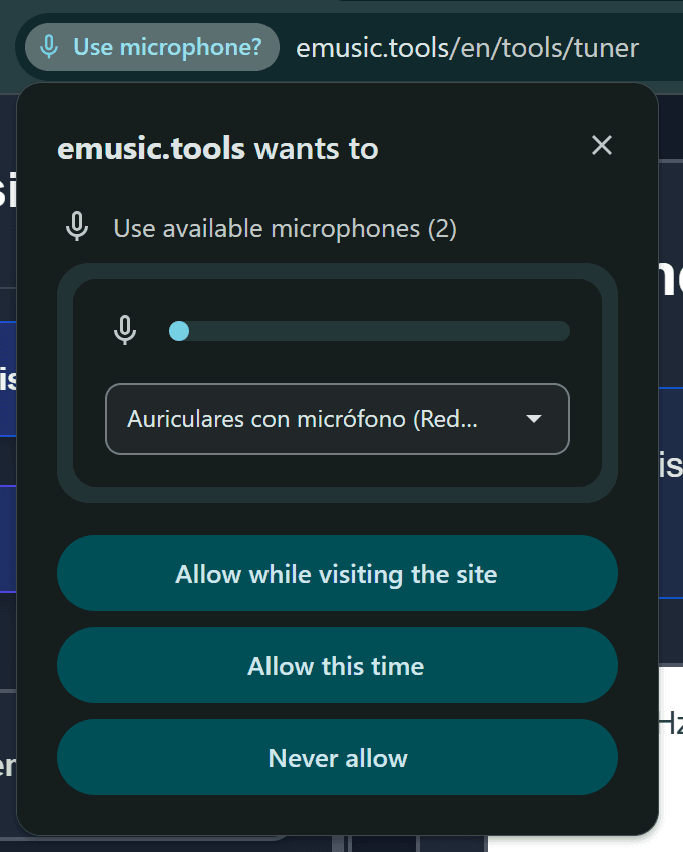
Go to emusic.tools, find the tuner section and click "Allow" when your browser asks for microphone access. If you don't allow it, it won't work.
Step 2: Play the string
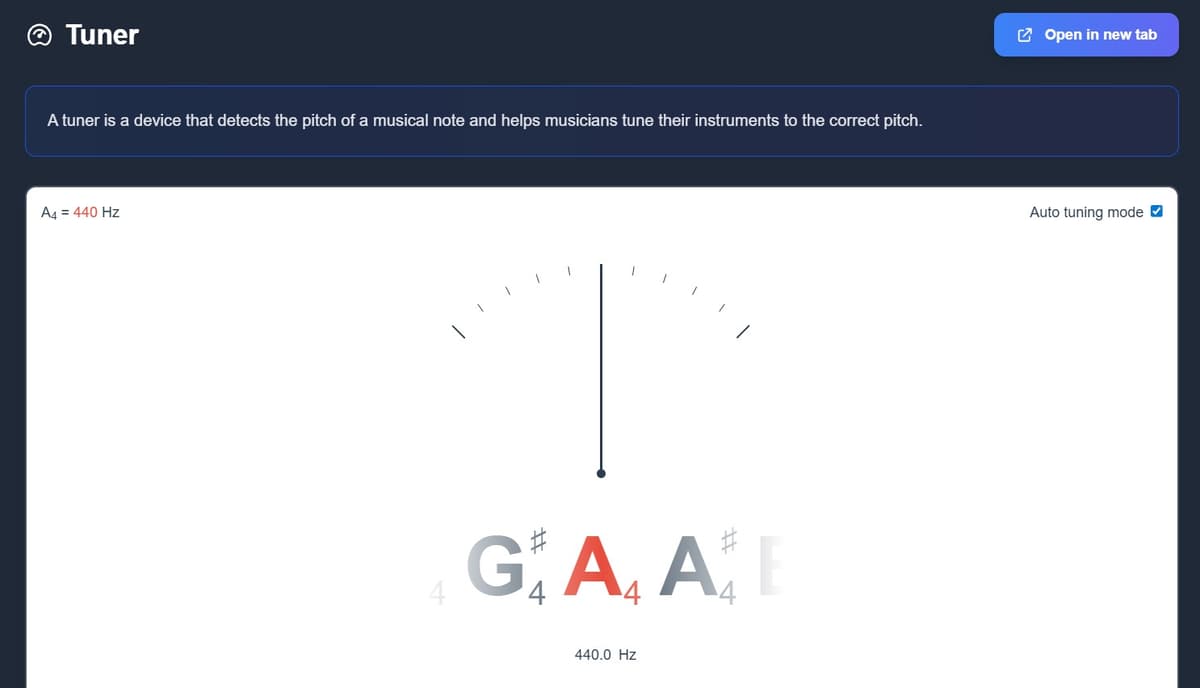
Pluck the string you want to tune with a clean, firm motion.
Step 3: Adjust the tuning peg
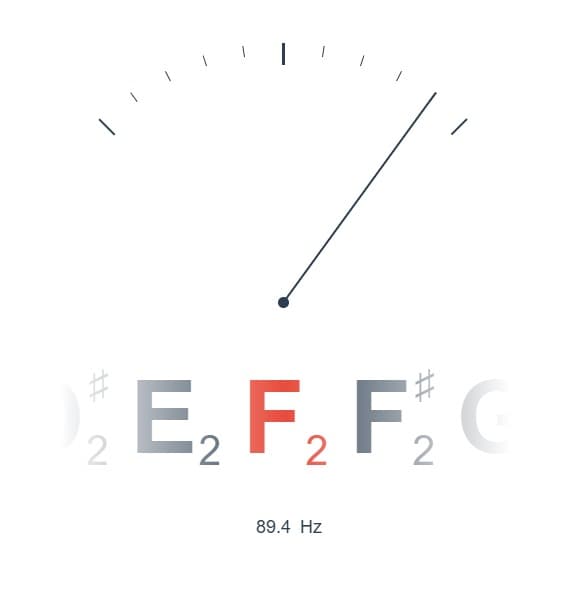
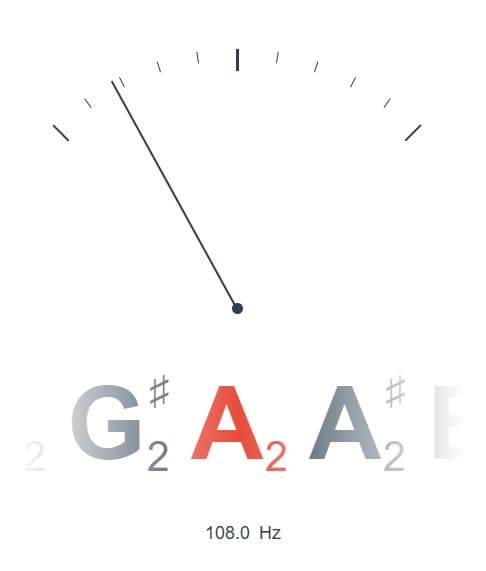
Watch the screen. If the needle goes to the right, loosen the string slightly. If it stays on the left, tighten it. When the indicator is centered (usually green), you're good.
Step 4: Follow the order
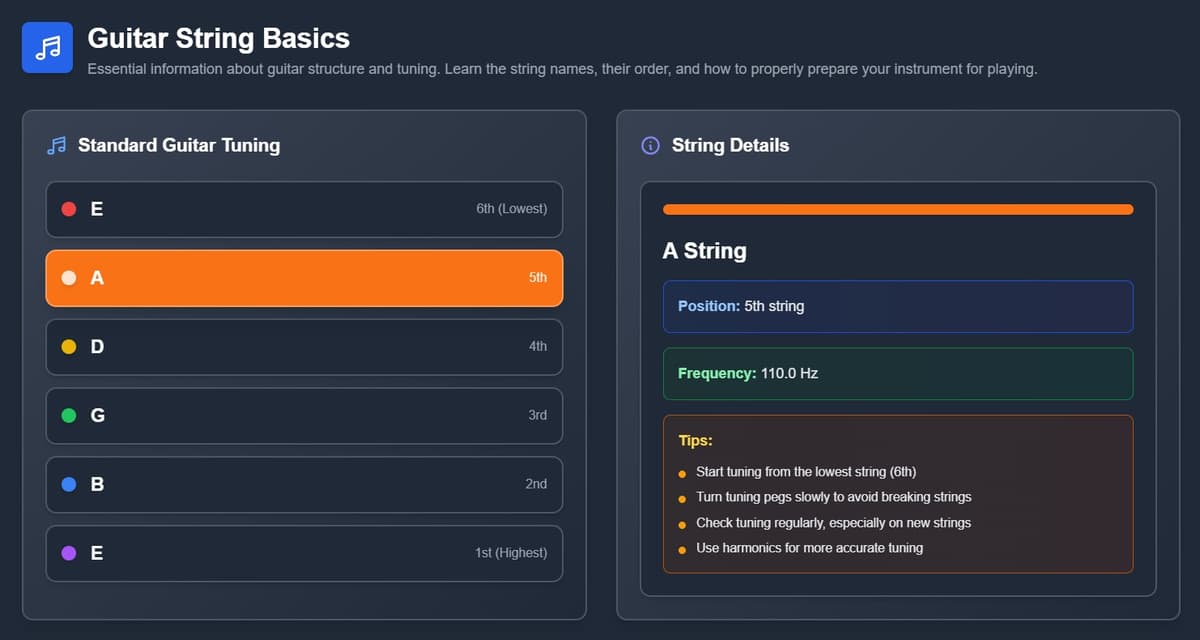
It's best to tune from the thickest string to the thinnest. The standard order is: E - A - D - G - B - E.
Beyond standard tuning: alternate tunings
Most people stick to standard tuning, but this tuner works great if you want to experiment:
- Drop D: makes rock sound heavier
- Open G or D: great for blues or slide playing
- Half-step down: useful if the singer struggles with high notes
A few "pro" tips to keep your guitar in tune longer
- The tension trick: Always tune from below. If the note is too high, loosen it more than needed and then tighten up to the correct pitch. This helps the string settle properly.
- Watch the weather: Temperature and humidity affect the wood, which can throw your tuning off. Always tune right before playing.
- New strings: If you've just changed them, stretch them gently by hand. At first, they'll go out of tune every few minutes until they settle.
The full reference: strings, methods and what goes wrong
Everything below used to sit underneath the tuner itself, folded into sections nobody opened. It belongs here, next to the how-to.
Guitar String Basics
Essential information about guitar structure and tuning. Learn the string names, their order, and how to properly prepare your instrument for playing.
Standard Guitar Tuning
String Details
Click on a string to see detailed information
Quick Tuning Tips
Memory Aid
E-A-D-G-B-E
Eddie Ate Dynamite, Good Bye Eddie
Tuning Order
Start with 6th string (low E), then work your way up to 1st string (high E)
Fine Tuning
Always tune up to pitch, never down. If too high, go below and tune up
The tuner is the fastest way in, but it is not the only one, and the others are worth knowing for the day your microphone will not cooperate.
Guitar Tuning Methods
Learn different methods to tune your guitar. Each method has its own advantages and is suitable for different situations and skill levels.
Electronic Tuner
The most accurate and easiest method for beginners
How to Use Electronic Tuner
- 1
Turn on your electronic tuner or tuner app
- 2
Pluck the string you want to tune
- 3
Watch the display - it will show if you're sharp (♯) or flat (♭)
- 4
Adjust the tuning peg until the display shows the correct note
- 5
Look for a green light or centered needle for perfect tuning
Advantages
- ●Most accurate method
- ●Works in noisy environments
- ●Shows exact pitch deviation
- ●Perfect for beginners
Limitations
- ●Requires a device/app
- ●Battery dependent
- ●May not work with very quiet instruments
Choosing the Right Electronic Tuner
Electronic tuners come in various forms. Here's what to look for:
Clip-on Tuners:
Attach to headstock, detect vibrations, work in noisy environments.
Pedal Tuners:
Professional stage use, true bypass, highly accurate for electric guitars.
App Tuners:
Convenient and free, use phone microphone, good for acoustic guitars.
Natural Harmonics
Using harmonics at specific frets for precise tuning
How to Use Natural Harmonics
- 1
Lightly touch the 6th string at the 5th fret (don't press down)
- 2
Pluck the string and lift your finger immediately
- 3
Listen to the harmonic tone produced
- 4
Play the 5th string open and compare the pitches
- 5
Adjust the 5th string until both tones match perfectly
Advantages
- ●No equipment needed
- ●Very accurate when done correctly
- ●Develops ear training
- ●Works anywhere
Limitations
- ●Requires good hearing
- ●Takes practice to master
- ●Difficult in noisy environments
- ●Need reference pitch for starting
Essential Harmonic Points for Guitar Tuning
Natural harmonics create pure tones that make pitch matching easier. Here are the key harmonic positions for standard tuning:
5th Fret Harmonics:
- 6th string (E) → 5th string (A)
- 5th string (A) → 4th string (D)
- 4th string (D) → 3rd string (G)
7th Fret Harmonics:
- 6th string (E) → 1st string (E)
- 5th string (A) → 2nd string (B) at 7th fret
Relative Tuning
Tuning strings relative to each other
How to Use Relative Tuning
- 1
Assume your 6th string (low E) is in tune
- 2
Press 6th string at 5th fret, this should match open 5th string
- 3
Press 5th string at 5th fret, this should match open 4th string
- 4
Press 4th string at 5th fret, this should match open 3rd string
- 5
Press 3rd string at 4th fret, this should match open 2nd string
- 6
Press 2nd string at 5th fret, this should match open 1st string
Advantages
- ●No equipment needed
- ●Good for emergency situations
- ●Builds ear training
- ●Always available
Limitations
- ●Only as good as reference string
- ●Errors can accumulate
- ●May drift over time
- ●Requires some musical ear
Piano Reference
Using piano keys as reference pitches
How to Use Piano Reference
- 1
Find middle C on piano (usually around center of keyboard)
- 2
Low E (6th string) = E below middle C
- 3
A (5th string) = A below middle C
- 4
D (4th string) = D above middle C
- 5
G (3rd string) = G above middle C
- 6
B (2nd string) = B above middle C
- 7
High E (1st string) = E above middle C
Advantages
- ●Piano provides stable reference
- ●Good for learning note relationships
- ●Visual aid with piano keys
- ●Accurate if piano is tuned
Limitations
- ●Requires access to piano
- ●Piano may be out of tune
- ●Need to know piano layout
- ●Octave confusion possible
Which Tuning Method Should You Choose?
For Beginners:
Start with electronic tuners for accuracy and ease. Once comfortable, learn relative tuning as a backup method when you don't have a tuner available.
For Advanced Players:
Master harmonic tuning for the most precise results. Combine with electronic verification for studio work or when perfect intonation is critical.
Drop D and Open G above were the short version. Here is the whole chart, string by string.
Alternative Guitar Tunings
Explore different tuning configurations to expand your musical possibilities and discover new sounds.
Drop D
Perfect for rock and metal. Only the low E string is tuned down to D.
String Notes
Common Genres
Benefits
- ●Easier power chords on bottom 3 strings
- ●Deeper, heavier sound
- ●Good introduction to alternate tunings
- ●Many popular songs use this tuning
Popular Songs
- ♪Everlong - Foo Fighters
- ♪Black - Pearl Jam
- ♪Moby Dick - Led Zeppelin
Practice Tips for Drop D
Getting Started:
- • Tune slowly to avoid breaking strings
- • Use a reliable tuner for accuracy
- • Let strings settle before final tuning
- • Start with simple open chord shapes
Exploring the Tuning:
- • Experiment with open string combinations
- • Learn common chord shapes for this tuning
- • Practice scales to understand fretboard changes
- • Record yourself to hear the unique sound
A guitar that drifts back out within a minute is telling you something. Usually it is the strings, sometimes the nut, occasionally the room.
Common Guitar Tuning Problems
Troubleshoot and solve the most frequent issues guitarists face when tuning their instruments.
Guitar won't stay in tune
Common Causes
- ●New strings
- ●Temperature changes
- ●Poor quality tuning pegs
- ●Intonation issues
Solutions
- 1Stretch new strings by gently pulling them away from the fretboard
- 2Tune multiple times - new strings need to settle
- 3Keep guitar in stable temperature environment
- 4Consider upgrading tuning pegs if they're worn
- 5Check intonation at 12th fret harmonic vs. fretted note
Tuner shows wrong note
Common Causes
- ●Wrong octave
- ●Harmonics interfering
- ●Background noise
- ●Dead battery
Solutions
- 1Make sure you're tuning to the correct octave
- 2Mute other strings while tuning
- 3Move to a quieter environment
- 4Replace tuner battery or charge device
- 5Use tuner's 'chromatic' mode instead of 'guitar' mode
Can't hear the tuner tone clearly
Common Causes
- ●Weak pickup signal
- ●Dead strings
- ●Poor playing technique
Solutions
- 1Pluck strings more firmly near the bridge
- 2Replace old, dead strings
- 3Clean guitar pickup if using electric guitar
- 4Use a clip-on tuner instead of built-in microphone
- 5Try different pickup position on electric guitar
Emergency Tuning Tips
Before a Performance
- • Tune 10-15 minutes before playing
- • Stretch strings gently after tuning
- • Check tuning again after stretching
- • Keep a backup tuner handy
String Breaks Mid-Performance
- • Have spare strings ready
- • Practice quick string changes
- • Learn to play around broken strings
- • Consider using a backup guitar
Once it holds, keeping it there is mostly a matter of habit.
Guitar Care & Maintenance
Keep your guitar in perfect condition with proper maintenance techniques and care routines.
String Maintenance & Replacement
1When to Change Strings
- Strings sound dull or lifeless
- Visible corrosion or dirt buildup
- Difficulty staying in tune
- Strings feel rough or sticky
- Generally every 2-3 months for regular players
2String Changing Process
- Remove old strings one at a time (never all at once)
- Clean fretboard while strings are off
- Wind new strings properly around tuning posts
- Stretch strings gently after installation
- Tune gradually, checking multiple times
3String Care Tips
- Wipe strings down after playing
- Wash hands before playing
- Use string conditioner if available
- Avoid touching strings unnecessarily
- Store guitar in stable humidity
Maintenance Schedule
After Each Use
- • Wipe down strings
- • Clean body surface
- • Store properly
Weekly
- • Deep clean fretboard
- • Polish body
- • Check tuning stability
Monthly
- • Full inspection
- • Intonation check
- • Hardware maintenance
Annually
- • Professional setup
- • Complete service
- • Replace worn parts
Going further
If you have ever needed to tune to 442 for an orchestra, drop to 415 for a baroque programme, or wondered what a just major third really sounds like, the advanced tuner lets you move the reference itself, and this guide explains what each setting changes.
Test yourself
Guitar Tuning Quiz
Test your knowledge of guitar tuning and maintenance
What is the standard tuning for a guitar?
Is it worth it compared to a traditional tuner?
Honestly, for everyday use or if you're just starting out, yes. A good physical tuner can cost €20-30. The emusic.tools one is free, takes up no space, and you always have it on your phone. It's the simplest, most practical option.
Conclusion
No more excuses for playing out of tune. Head over to emusic.tools and get your guitar ready in a minute. Time to play.

